 gaetano
This tool is available on GitHub and written in Python. Here is provided a theoretical explanation behind this tool.
Motivation
This project explains how to build a tool for system administrators, developers, and researchers that generates a fixed CPU load for a finite period using a PID regulator.
Some use case for this tool can be:
- Performance Testing: This script allows users to stress test applications and systems by generating a specific CPU load, helping identify performance bottlenecks and ensuring robustness under different load conditions.
- Resource Allocation Optimization: System administrators can use this script to simulate various load scenarios, optimize resource allocation, and ensure critical applications receive the necessary computational power.
- Benchmarking: This script enables precise benchmarking by providing a consistent and repeatable load, facilitating the comparison of different systems, CPUs, or configurations.
- Education and Training: educators can use this script to demonstrate the effects of CPU load on system performance, providing hands-on experience for students and trainees. Moreover, university students can benefit from this tool, by understanding how to use in practice a PID regulator in a discrete environment.
- Thermal and Power Consumption Analysis: the tool can study the thermal behavior and power consumption of CPUs under controlled load conditions.
PID Regulator for Controlling CPU Load
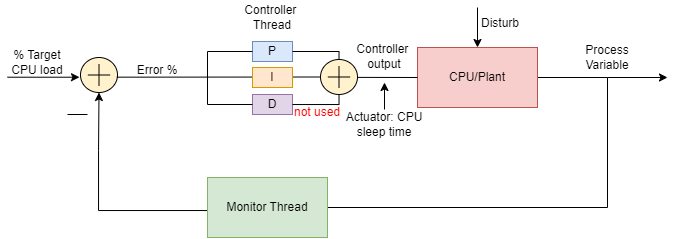 PID regulator for controlling CPU load
In this paragraph, a design explanation of the Python tool available on GitHub is provided. Figure description below:
- CPU Target Load: Desired percentage of CPU load on a specific core.
- Monitor Thread: Measures the percentage of actual CPU load on the specific core.
- Error: Percentage error of measured CPU load with respect to the target.
- Controller Thread: PID regulator with integral and proportional actions.
- Controller Output: The actuator signal that will adjust the CPU core load based on the measured error.
- CPU Load: The actual plant is the specific CPU core load.
- Disturb: Any other process that can disturb the CPU core load.
- Process Variable: The actual CPU load measured by the Monitor Thread after the control action.
Monitor Thread
The Monitor Thread samples the CPU load at regular intervals, filters the measurements with a first-order filter, and logs various parameters over time. The value measured by Monitor Thread is calculated using the psutil method cpu_percent(interval) which calculates the CPU usage during the specified interval. The call cpu_percent blocks the thread for the duration of the interval, ensuring that the loop naturally waits for the specified sampling time before proceeding to the next iteration. In this case psutil.Process has been called, which means that the method measures the CPU usage generated by this particular process.
Controller Thread
The Controller Thread compares the CPU Load measured by the Monitor Thread and the Target CPU Load desired also known as set point. Based on the difference between them, also known as tracking error, the PID regulator computes the control signal and sends it to the actuation device. It, in turn, drives the plant to the desired process value (set point).
When the error is fed to the PID regulator, it computes the:
- P proportional
- I integral
- D derivative
contribution of this error signal with respect to time. In this project, the derivative contribution is not used. The proportional and integral components are weighted by a coefficient and then summed up. The output of this operation is the actuator signal which in our case is the sleep time used in the actuator function that generates CPU Load.
    def generate_load(self, sleep_time):
        interval = time.time() + self.period - sleep_time
        # generates some getCpuLoad for interval seconds
        while time.time() < interval:
            pr = 213123  # generates some load
            _ = pr * pr
            pr = pr + 1
        time.sleep(sleep_time)
In a nutshell, if the error is positive we need to increase CPU Load by reducing the sleep_time of the actuator function above. On the other hand, if the error is negative we need to decrease CPU Load by increasing the sleep_time.
The tuning of the proportional kp and integral ki coefficients has been made by an extensive campaign of experiments. The code is available on GitHub. The PID regulator function is the following:
    def run(self):
        def cpu_model(cpu_period):
            sleep_time = self.period - cpu_period
            return sleep_time

        self.shutdown_flag.clear()
        while not self.shutdown_flag.is_set():
            # ControllerThread has to have the same sampling interval as
            # MonitorThread
            time.sleep(self.sampling_interval)

            # get all variables
            with self.target_lock, self.cpu_lock:
                CT = self.CT
                cpu = self.cpu

            self.err = CT - cpu * 0.01  # computes the proportional
            #  error
            ts = time.time()

            samp_int = ts - self.last_ts  # sample interval
            self.int_err = self.int_err + self.err * samp_int  # computes the
            #  integral error
            self.last_ts = ts
            self.cpuPeriod = self.kp * self.err + self.ki * self.int_err

            # anti wind up control
            if self.cpuPeriod < 0:
                self.cpuPeriod = 0
                self.int_err = self.int_err - self.err * samp_int
            if self.cpuPeriod > self.period:
                self.cpuPeriod = self.period
                self.int_err = self.int_err - self.err * samp_int

            self.set_sleep_time(cpu_model(self.cpuPeriod))
The anti-windup control ensures that the PID action does not generate a negative cpuPeriod or a cpuPeriod larger than the actuation period.
PID Regulator Insights
Here are some considerations on the PID regulator and why proportional action alone is insufficient. Increasing the proportional gain (kp) proportionally increases the control signal for a given level of error. This means the controller will "push" harder for the same error, causing the closed-loop system to react more quickly but also increasing the risk of overshoot. Another effect of increasing kp is that it tends to reduce, but not eliminate, the steady-state error.
Adding an integral term to the controller (ki) helps reduce the steady-state error. The integral term accumulates the error over time, increasing the control signal and driving the error down. However, a drawback of the integral term is that it can make the system more sluggish and oscillatory. When the error signal changes sign, it may take a while for the integrator to "unwind." This is why anti-windup mechanisms are also needed.
Results
The tool can be tested easily by creating a code space on GitHub
Example: Generate 55% load on core 0, 12% on core 3, until the program is interrupted through Ctrl-C:
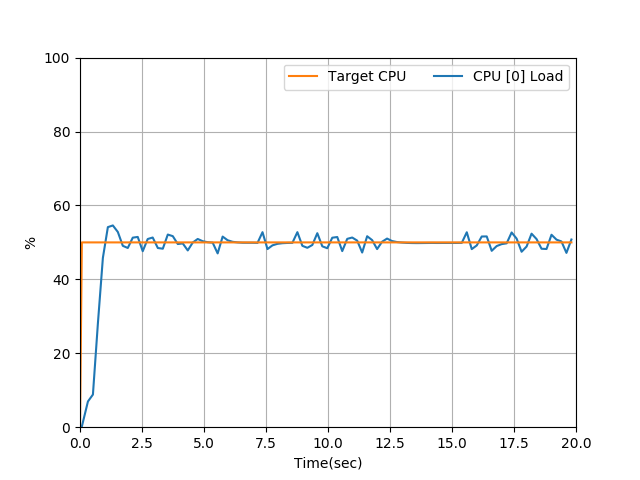
./CPULoadGenerator.py -c 0 -c 3 -l 0.55 -l 0.12Example graph of CPU load of 50% on core 0 for 20 seconds: